
UDID Card Status Check 2026: How to Track Your Application Online
Did you apply for a UDID Card and want to know what stage your application has reached? Whether your application is under verification, awaiting medical assessment, approved, or your card has already been dispatched, you can easily track its progress online through the official UDID portal.
The Government of India provides a free online tracking facility that allows applicants to check the status of their UDID Card application from anywhere using their Enrollment Number, Aadhaar Number, Mobile Number, or UDID Number. This eliminates the need to visit government offices just to get an update.
In this guide, you will learn how to track your UDID Card status online step by step, understand the meaning of different status messages, check dispatch updates, identify common reasons for delays, and find out what to do if your application is pending, rejected, or your card has not been received.
What is UDID Card Status Tracking?
UDID card status tracking is an online service on the official Swavlamban portal (swavlambancard.gov.in) that allows applicants to view the real-time progress of their disability card applications. Instead of traveling to a government office, waiting in queues, and asking officials for updates, you can check the status from your mobile or computer at any time.
Information You Need Before Tracking
Before you visit the tracking page, keep at least one of the following details ready. You will need to enter one of these to search for your application.
Enrolment Number
Your enrolment number is generated automatically when you successfully submit your application on the UDID portal. It is sent to your registered mobile number as an SMS. It usually looks like: EN/YEAR/STATE/XXXXXXX.
Aadhaar Number
You can also use the 12-digit Aadhaar number you provided during registration. This is useful if you have misplaced or forgotten your enrolment number.
Mobile Number
The mobile number you used when filling out the application form. The portal may accept this to locate your application record.
UDID Number
If your UDID card has already been generated (i.e., your application reached the card generation stage), you can use the UDID number itself to check further dispatch and delivery updates.
How Can I Check UDID Card Status Online?
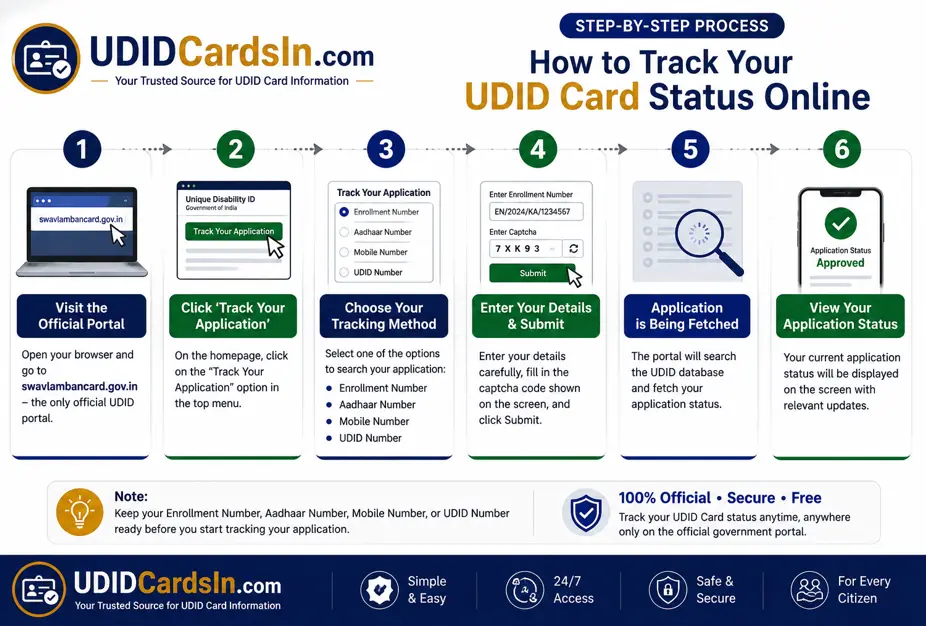
Follow these six simple steps to check the status of your UDID card application online. The entire process takes under 3 minutes.
Step 1 — Open the Official UDID Portal
Open any web browser (Chrome, Firefox, or Safari) on your phone or computer. In the address bar, type swavlambancard.gov.in and press Enter. This is the only official government portal for UDID tracking. Do not use any third-party websites.
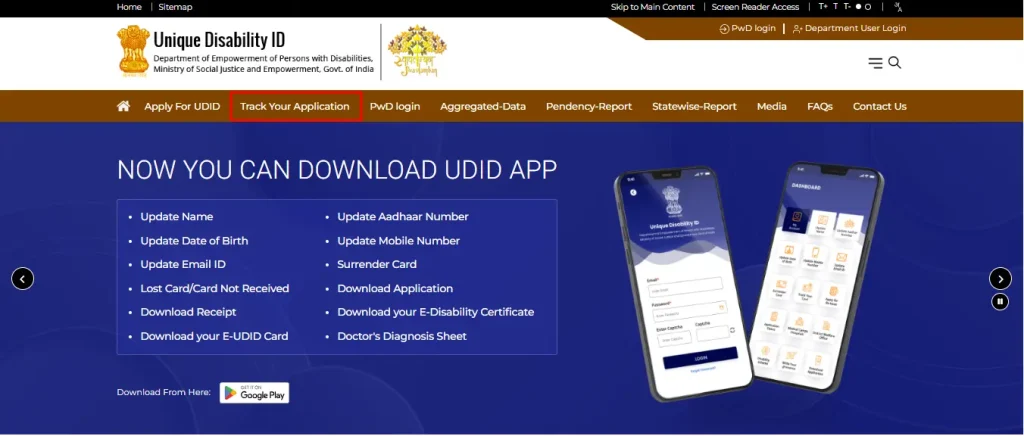
Step 2 — Click ‘Track Your Application’
On the home page of the portal, you will see the “Track Your Application” option in the header menu bar. Click on it to open the login form or page. The screenshot of the menu bar is attached.
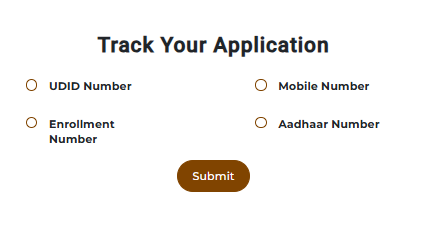
Step 3 — Choose Your Tracking Method
A tracking form will appear. You will see a set of options asking how you want to search. Choose one of the following:
Step 4 — Enter Your Details
Type your chosen identifier carefully in the input field. Then look at the captcha image shown on screen and type the characters exactly as displayed. Captchas are case-sensitive.
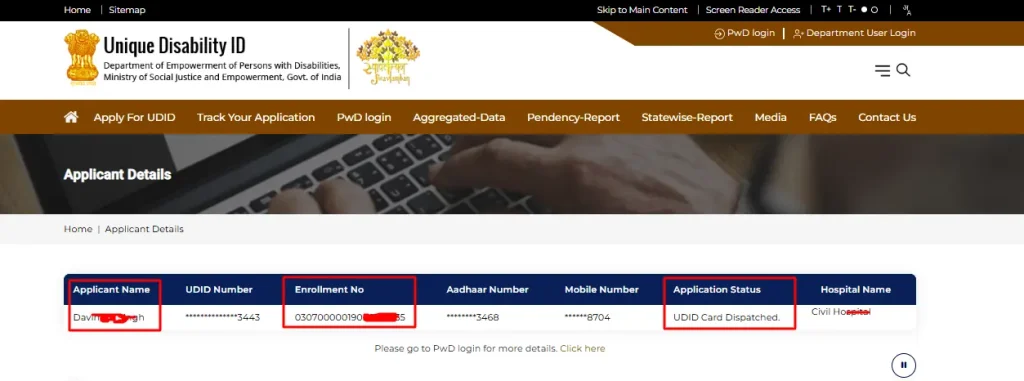
Step 6 — Read Your Application Status
Your current application status will appear on the next screen. It will show which stage your application is at, along with any relevant dates. See Section 6 of this guide for a full explanation of every possible status message.
Understanding Every UDID Application Status Message
When you track your application, the portal will show one of the following status messages. This table explains what each one means and what action, if any, you need to take.
|
Status Message |
What It Means |
What You Should Do |
|---|---|---|
|
Application Submitted |
The portal has successfully received your form. |
No action needed. Wait for verification to begin. |
|
Under Verification |
Officials at the district office are checking your documents. |
Ensure your uploaded documents are clear and valid. No action unless contacted. |
|
Documents Incomplete / Deficient |
One or more documents are missing, unclear, or incorrect. |
Log in to swavlambancard.gov.in and re-upload the correct documents immediately. |
|
Medical Assessment Pending |
The CMO/DMO office has not yet scheduled your disability assessment. |
Wait for an SMS/notification with your appointment date and hospital details. |
|
Medical Assessment Scheduled |
Your appointment with the specialist doctor has been fixed. |
Note the date, time, and hospital. Carry all original documents on the day. |
|
Assessment Completed |
The specialist doctor has submitted the disability assessment report. |
Wait for the medical board to review the report and make a decision. |
|
Approved by Medical Authority |
The medical board has approved your disability certificate. |
Your UDID card is now being prepared. No action needed. |
|
UDID Card Generated |
Your unique UDID number has been successfully issued. |
You can now log in and download the e-UDID Card as a PDF. |
|
Card Printed |
The physical card is being printed and prepared for dispatch. |
Ensure your registered address is correct in the portal. |
|
Card Dispatched |
The physical UDID card has been sent by post to your address. |
Keep track of the delivery. Contact India Post or your local post office if it is delayed. |
|
Delivered |
The card has been delivered. The process is complete. |
If not received, contact your district office with the tracking reference. |
|
Rejected |
The application did not meet the required criteria. |
Read the rejection reason on the portal. You may reapply or appeal. |
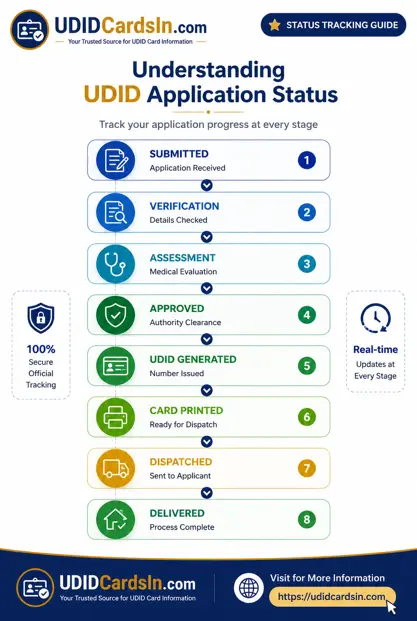
How Long Does It Take to Get a UDID Card?
The official government timeline for UDID card processing is 9 days from the date the medical assessment is completed. However, the total time from initial application to card delivery depends on several stages:
|
Stage |
Typical Timeframe |
Can Be Longer If… |
|---|---|---|
|
Application submission to verification |
3–7 days |
Documents are missing or unclear |
|
Document verification to medical scheduling |
1–3 weeks |
High workload at the CMO/DMO office |
|
Medical assessment to approval |
7–14 days |
The medical board meets infrequently in your district |
|
Approval for card generation |
3–7 days |
Technical delays in the portal |
|
Card generation to physical dispatch |
7–14 days |
Printing backlog in your state |
|
Dispatch to delivery |
7–21 days |
Remote location or postal delays |
|
Total (average) |
4–8 weeks |
Up to 3–6 months in some districts |
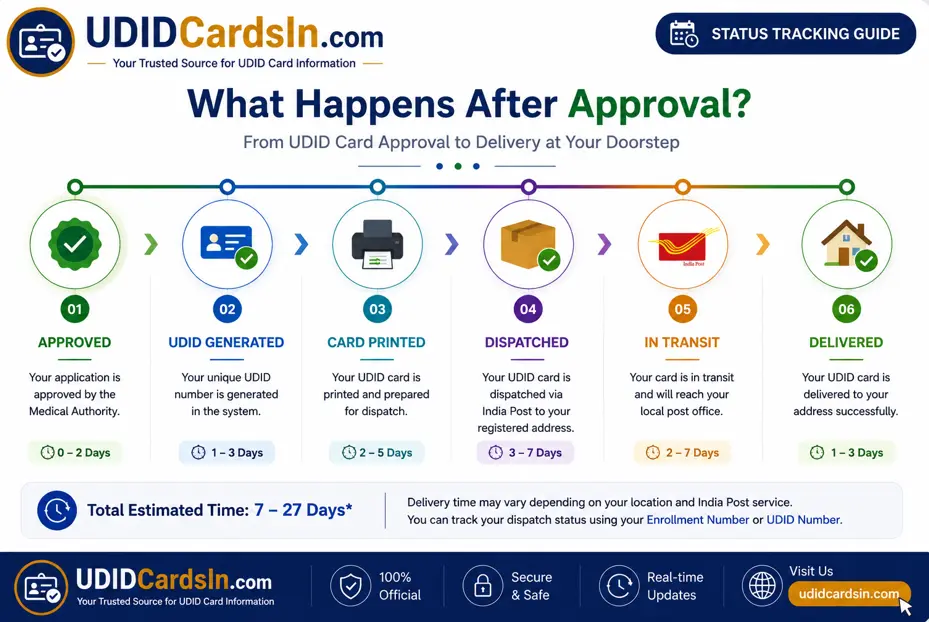
UDID Card Approved But Not Received — What to Do
This is one of the most common concerns: your UDID portal shows that the card has been ‘Approved’ or even ‘Dispatched,’ but weeks have passed and nothing has arrived in your post. Here is exactly what to do.
Step 1 — Check the Dispatch Status on the Portal
Log in to swavlambancard.gov.in and check if the status says ‘Card Dispatched.’ If it says ‘Approved’ or ‘Card Generated’ but not yet ‘Dispatched,’ the card is still at the printing stage. Wait 7–10 more days.
Step 2 — Contact India Post
If the status says ‘Card Dispatched,’ the physical card is on its way via India Post. Note the dispatch date shown on the portal. Cards typically take 7–21 days after dispatch to reach the recipient. Contact your local post office with your name and registered address to check for any pending deliveries.
Step 3 — Contact Your District CMO Office
If more than 30 days have passed since dispatch and the card has still not arrived, contact your district’s Chief Medical Officer (CMO) or District Medical Officer (DMO). Provide your UDID number and enrollment number when you call or visit.
Step 4 — Download the e-UDID Card
While waiting for the physical card, you can download and use your digital e-UDID card (PDF format) from the portal. It is legally valid across all of India for accessing government schemes and benefits.
Step 5 — Raise a Grievance
If no resolution is provided, file a formal grievance at pgportal.gov.in under the Ministry of Social Justice and Empowerment. Use ‘Unique Disability Identity Card’ as the subject.
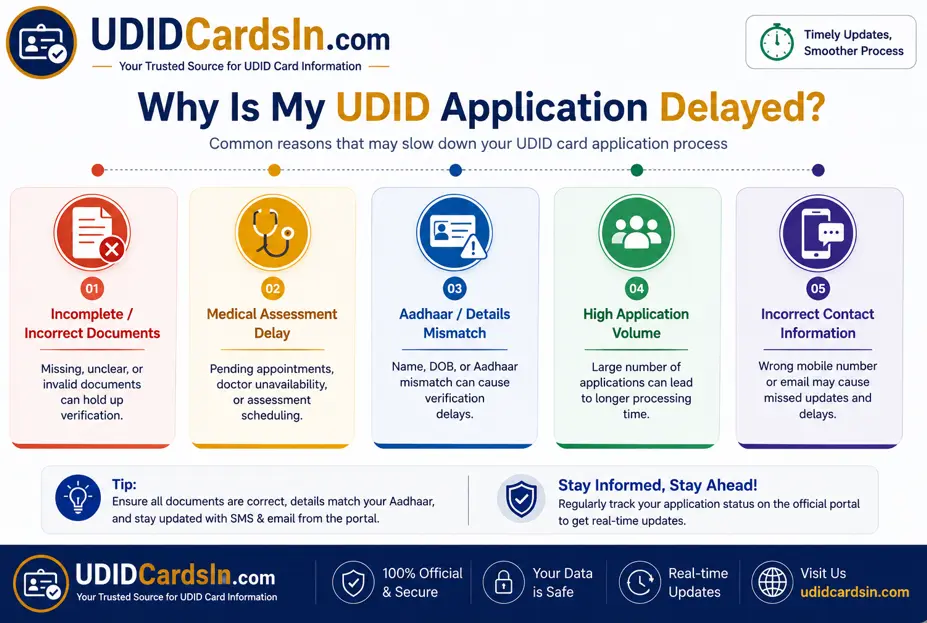
Common Reasons for UDID Application Delays
Understanding why delays occur can help you take steps to avoid or resolve them more quickly.
Incomplete or Unclear Documents
If the quality of your Aadhaar card, disability certificate, or photograph is poor, the verifying officer may be unable to approve them. Always upload documents at the recommended file sizes: photographs (15–100 KB in JPEG/PNG) and documents (10–500 KB in JPEG/PNG/PDF).
Medical Assessment Scheduling Delays
The CMO or DMO office must schedule you with a specialist doctor for your disability assessment. In districts with a high volume of applications or limited medical staff, this scheduling can take 3–6 weeks. There is limited action you can take here, but contacting the CMO office to confirm your appointment has been scheduled helps.
Aadhaar Mismatch
Your name, date of birth, or address in the UDID application must exactly match what is on your Aadhaar card. Even a minor spelling difference can cause the application to be flagged for manual review, which adds weeks to processing time.
High Application Volume in Your District
Certain states and districts process thousands of applications simultaneously. Processing backlogs is common and can add 4–8 weeks to the overall timeline.
Incorrect Contact Information
If your mobile number or address was entered incorrectly during registration, you may miss notifications about your medical appointment or card dispatch. Contact your CMO office to update details.
Common Errors While Tracking and How to Fix Them
|
Error Message |
Likely Cause |
How to Fix |
|---|---|---|
|
No Record Found |
Wrong enrollment number, Aadhaar, or mobile number entered |
Double-check your SMS/email receipt for the correct enrollment number. Try a different tracking method (e.g., Aadhaar instead of enrollment number). |
|
Invalid Enrollment Number |
Number entered with spaces, dashes, or incorrect format |
Enter the number exactly as shown on your receipt, with no spaces or dashes. |
|
Captcha Error |
Characters entered incorrectly, or the image is not loading |
Refresh the page (F5) to get a new captcha. Try entering it again carefully. |
|
Website Not Opening |
Server maintenance or internet issue |
Try again after 30 minutes. Use a different browser (Chrome or Firefox recommended). Check your internet connection. |
|
Status Shows’ Pending’ for Months |
Stuck at the verification or medical scheduling stage |
Contact your district CMO office directly. Provide your enrollment number and follow up in person if needed. |
How to Download Your e-UDID Card
Once your status shows ‘UDID Card Generated’, you do not need to wait for the physical card to arrive. You can download a digital PDF version immediately and use it for all official purposes.
|
Good to know: Your digital e-UDID card is also available in DigiLocker. Link your Aadhaar to DigiLocker and search for ‘UDID Card’ to access it anytime without downloading. |
How to Track UDID Card Dispatch Status
After the physical card is printed, it is dispatched to your registered address via India Post. The UDID portal will show one of these dispatch-related statuses:
If the status shows ‘Card Dispatched’ but you have not received it after 21 days, contact your local post office or India Post customer care at 1800 11 2011 (toll-free). Provide your name and registered address to check for pending or returned mail.
Frequently Asked Questions (FAQs)
Conclusion
Now you can check the status of your application online by visiting the official portal at swavlambancard.gov.in. Click on the “Track your application” option, select your input information from the given options, and provide the required information. Click the “Submit” button to get the current status of your application.
It is a free, 24/7 portal that helps applicants track the status of their applications online from their computers or smartphones without visiting any office. This portal really helps applicants conveniently track the status of their application and UDID card.
If your application has been stuck at the same status for more than 30 days, do not wait in silence. Contact your district CMO office, call the national helpline at 011-24365019, or file a grievance at pgportal.gov.in. If your application remains pending for an extended period, contact your district medical authority or use the official grievance channels for assistance.
Disclaimer: This is an independent informational guide published by udidcardsin.com. It is not affiliated with or endorsed by the Government of India or DEPwD. For official services, always visit swavlambancard.gov.in.